
Forensic web page acquisition software: how to choose
Forensic acquisition software for web pages opens the page in a controlled environment, records what the site sends and packages the results in a verifiable evidence bundle. Products differ in their acquisition methods, the material they deliver and their pricing. This guide offers ten questions to help you choose, followed by a comparison of the features described on vendors’ websites.
This guide is written by the makers of C.E.R.T.O., one of the products examined. The comparison uses information published by each vendor and records when it was consulted. It also explains C.E.R.T.O.’s limitations and the features it does not offer.
Ten questions to ask before choosing
1. Does it save the page, or only a picture of it?
A screenshot shows what the page looked like. To document its content as well, look for a tool that keeps the page’s code after it has loaded and its associated resources: many sites build what you see directly in the browser. An archive of the browsing session also lets you revisit the saved content after the original site becomes unavailable.
2. Does it record network traffic, and in which format?
A traffic recording documents the exchanges between the browser and the server. Two common formats are HAR and PCAP, which capture information at different levels:
- HAR records HTTP requests and responses as seen by the browser, in readable form, including URLs, headers and timings;
- PCAP captures packets at the network level: it records the data sent over the connection. With HTTPS, however, the content is encrypted, and reading it also requires the session keys.
Check which format is saved and whether the bundle also includes provenance data: DNS resolution, TLS certificate and IP address.
3. Which time source does it use?
The computer’s clock can be changed by the user. Check whether the software consults external time sources and reports any difference between those sources and the computer’s clock.
4. Does it hash every file?
A file hash allows changes to be detected. Make sure it is computed for every file in the bundle, not only for the final archive, and check which algorithms are used.
5. What type of timestamp does it apply?
A timestamp is a date applied by a third party. If it is qualified under the eIDAS Regulation, it benefits from a presumption that the date is accurate and that the timestamped data is intact (Art. 41(2)); if it is not, it remains usable as evidence but without that presumption. Check which type is included and whether a qualified timestamp costs extra.
6. Does it run on your computer or on the vendor’s servers?
With a cloud service, browsing happens on the vendor’s servers: the site sees the IP address of those servers, and any account sign-in takes place in the remote environment. With an installed program, browsing starts from your own connection and the material is collected on your computer. Choose the approach that best suits the content you need to capture and your working requirements.
7. Can recipients verify the bundle independently of the vendor?
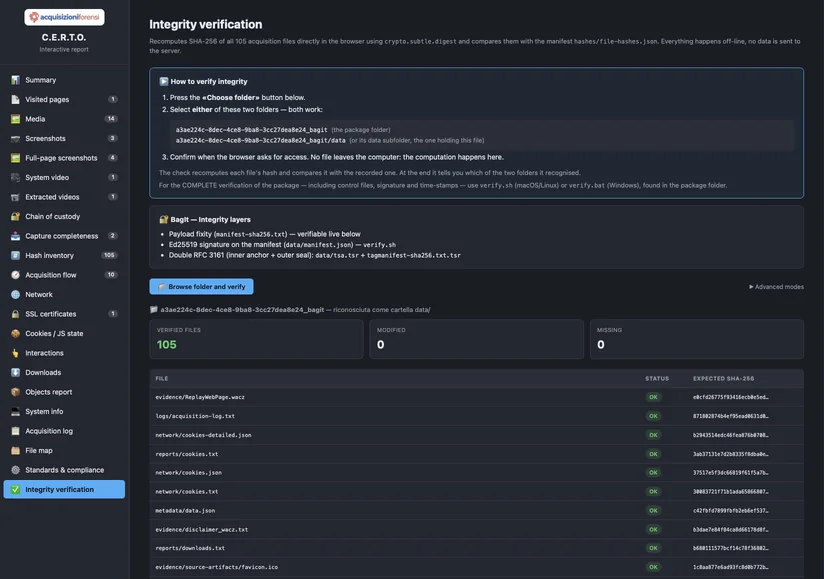
Independent verification is an important consideration. If the checks require access to the vendor’s site, they depend on that service being available. If the bundle includes the necessary tools, recipients can recalculate the hashes and check file integrity themselves.
8. How does it handle social media and dynamic pages?
Comments and replies are often loaded only when you scroll the page or open individual threads. Ask whether the software collects this content from the platform’s data source or keeps only what appears on screen.
9. Does it document its limitations?
The report should identify any content that could not be acquired and record any errors. A note such as “412 comments acquired out of 430 indicated by the platform; collection stopped because…” helps the reader understand how complete the material is and what limitations to consider when assessing it.
10. How is it priced?
Common pricing models include charges based on session duration, credit packages, annual licences and per-acquisition fees. The best value depends on how often you use the software and how long your sessions last. Pay-as-you-go pricing may suit occasional use, while a licence may be more economical for regular work.
Product comparison: features reported by vendors
Information collected from vendors’ websites on 30 September 2026. Items missing from the pages consulted are marked as not stated. Prices and features can change: before choosing, check the current terms on the vendor’s site. These products are mainly offered on the Italian market, and their pages are in Italian.
| Product | How it works | What it delivers | Network traffic | Published price |
|---|---|---|---|---|
| FAW fawproject.com |
Desktop forensic browser; single-page, scheduled and multi-page acquisitions; Tor and FTP support | HTML code and headers, linked resources with hashes listed in a summary file, screenshots; verification data also stored on a remote server | PCAP, through Wireshark integration | Licence pricing available on the vendor’s website (not listed here) |
| LegalEYE PRO Namirial |
Browser-based cloud service, with no installation required; supports pages that require login | Encrypted archive with session video, screenshots, downloaded content, technical report and timestamp | Not stated on the page consulted | €59 + VAT for 5 minutes; €245 + VAT for 60 minutes within 24 hours; €1,350 + VAT per year |
| Web Forensics Kopjra |
Cloud service with a dedicated browser and virtual machine; a free “Instant” version exists for public pages | Video and audio of the browsing session, screenshots, downloaded files, TLS keys, virtual machine image, logs, hash summary and technical report; downloadable sample | Network traffic with TLS keys | From €250 + VAT for 12 daily credits; from €1,500 + VAT if carried out by an expert |
| ForBrowser Action Labs |
Software with a built-in browser; web pages, email accounts, FTP servers | Content hashed using multiple algorithms, detailed logs, session video with a timestamp overlay | PCAP | €780 for the first year (web only); €880 with email; €980 with email and FTP |
| TrueScreen Forensic Browser TrueScreen |
Program for Mac and Windows, plus a mobile app and a browser extension | Screenshots, page code, MHTML archive, session video and audio, downloaded files with hashes, report | HAR; optional PCAP, with the session limited to eight minutes | Not stated on the page consulted |
| C.E.R.T.O. Web pages module |
Desktop software for 64-bit Windows and Macs with Apple silicon; built-in browser with support for pages that require login | Screenshots, page code captured after loading, WACZ archive, session video, DNS, WHOIS, traceroute, TLS certificates, hashes calculated using four algorithms, signature, two timestamps, verification tools; downloadable sample bundles | HAR. It does not capture raw packets (PCAP) | 2 slots per acquisition, 4 with a qualified timestamp; a slot costs between €3 and €6 |
C.E.R.T.O.: features, costs and limitations
Here is how C.E.R.T.O. meets these criteria, along with the needs that require additional tools or services.
- What it offers. The bundle includes the tools for independent verification (
verify.sh,verify.batand a dashboard), which can be used without installing C.E.R.T.O. File hashes can be checked offline. Verifying the signature and timestamps requires OpenSSL 3; if it is missing on a Mac, the script downloads a verification kit. That one-time download requires an Internet connection. On social media, C.E.R.T.O. collects comments and replies from the platform’s data source and records both the number reported by the platform and the number actually acquired. You pay per acquisition, with no subscription, and slots do not expire. - Its limitations. It does not capture network packets: it records the HTTP traffic from the browser (HAR) and, separately, DNS, traceroute and certificates. The two timestamps included as standard are not qualified; a qualified eIDAS timestamp is available for an additional 2 slots. The program is installed on a computer: there is no mobile app and no cloud version. Assistance from a forensic expert must be arranged separately.
You can inspect the output before registering: the How it works page has two sample bundles to download and verify.
The tool is not enough: method matters
The standards and guidance referenced by these products to varying degrees — the ISO/IEC 27037 standard on handling digital evidence and the SWGDE best practices for acquiring online content — focus on the method rather than a particular product. The process should be documented, repeatable and verifiable by a third party. Software helps document what was done. The person carrying out the acquisition must still decide what to capture, when to act and how broadly to browse. We discuss this in Digital evidence standards and in How to certify a web page.
Frequently asked questions
What is the best forensic acquisition software for web pages?
The choice depends on what you need to capture and how often. Occasional users may prioritise ease of setup and cost. Forensic experts may need detailed technical data and configuration options, while law firms may focus on clear reports and straightforward verification. Use the ten questions in this guide to compare products against your priorities.
Do I need traffic in PCAP format, or is HAR enough?
HAR documents the HTTP requests and responses, that is, what the site sent to the browser: this is relevant to most disputes about page content. PCAP provides network-level data, which can be useful when the connection or underlying infrastructure is in question. If your expert requires it, choose a tool that produces it: C.E.R.T.O. does not.
Can non-technical users operate it?
Many modern tools are designed for lawyers, businesses and individuals as well as technical specialists. You enter a web address and browse while the software records the technical details. You still need to decide what to capture and when.
Does the software replace the forensic expert?
The software automates data collection. An expert interprets the findings, assesses the method used and can explain the results in court. You can therefore capture content at risk of removal immediately and ask a professional to review the bundle later. See Forensic expert or self-service capture?
How much does forensic acquisition software cost?
The price lists consulted on 30 September 2026 use different models: per-acquisition fees, sessions at €59 + VAT for five minutes and annual licences between €780 and €1,350. To compare them, also consider session length, included features and VAT. With C.E.R.T.O. a web page acquisition costs 2 slots, and you receive 2 free slots when you confirm your email address. Current prices are on the dedicated page.